Steward
分享是一種喜悅、更是一種幸福
程式語言 - Wine - C/C++ - Set Pixel
參考資訊:
http://www.winprog.org/tutorial/
http://winapi.freetechsecrets.com/win32/
https://github.com/gammasoft71/Examples_Win32
http://masm32.com/board/index.php?topic=3584.0
https://learn.microsoft.com/en-us/windows/win32/winmsg/window-styles
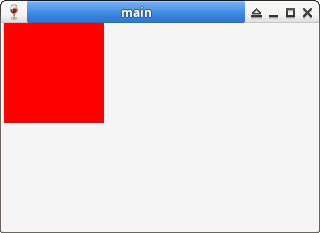
屏幕的最小顯示單位是像素,像素由紅色(Red)、綠色(Green)、藍色(Blue)、Alpha等四個顏色組成,因此,在呼叫CreateWindow()時,傳入的解析度,如:320x240,代表該視窗(有效區域)的X軸有320個像素,而Y軸則是有240個像素,這個320x240像素的區域是可以用來繪製任何東西,WM_PAINT是處理視窗重新繪畫的事件,繪畫的相關處理都需要在這個事件完成,比較特別的是,Windows視窗將繪圖的許多東西抽象化,最基本的需求是:一個DC(Device Context)和一個BITMAP,DC可以想像成是一個畫台,而BITMAP則是一片畫布(Buffer),DC有了Buffer就可以畫上任何東西並將其顯示在視窗上
main.c
#include <windows.h>

static HWND hWin = NULL;
static WNDPROC defWndProc = NULL;

static LRESULT CALLBACK WndProc(HWND hWnd, UINT uMsg, WPARAM wParam, LPARAM lParam)
{
    int x = 0;
    int y = 0;
    HDC hdc = NULL;
    PAINTSTRUCT ps = { 0 };

    switch (uMsg) {
    case WM_CLOSE:
        DestroyWindow(hWnd);
        return 0;
    case WM_DESTROY:
        PostQuitMessage(0);
        return 0;
    case WM_PAINT:
        hdc = BeginPaint(hWnd, &ps);
        for (y = 0; y < 100; y++) {
            for (x = 0; x < 100; x++) {
                SetPixel(hdc, x, y, RGB(0xff, 0x00, 0x00));
            }
        }
        EndPaint(hWnd, &ps);
        break;
    }

    return CallWindowProc(defWndProc, hWnd, uMsg, wParam, lParam);
}

int WINAPI WinMain(HINSTANCE hInstance, HINSTANCE hPrevInstance, LPSTR lpCmdLine, int nCmdShow)
{
    hWin = CreateWindow(WC_DIALOG, "main", WS_OVERLAPPEDWINDOW | WS_VISIBLE, 0, 0, 320, 240, NULL, NULL, NULL, NULL);
    defWndProc = (WNDPROC)SetWindowLongPtr(hWin, GWLP_WNDPROC, (long int)WndProc);

    MSG msg = { 0 };
    while (GetMessage(&msg, NULL, 0, 0)) {
        DispatchMessage(&msg);
    }

    return 0;
}
編譯、執行
$ winegcc main.c -o main -lgdi32
$ wine main.exe.so