Steward
分享是一種喜悅、更是一種幸福
掌機 - GPD Win - Debian 11.0 - 安裝系統
安裝步驟:
1. 下載Debian 11.0 ISO並且制作USB開機片
2. 接著透過USB開機(Fn + F7)並按照一般安裝步驟就可以安裝完成
3. 其它設定、安裝(先透過其它USB網卡上網安裝)
$ sudo vim /etc/X11/xorg.conf.d/20-gpudriver.conf
    Section "Device"
        Identifier "Intel Graphics"
        Driver     "intel"
        Option     "TearFree" "true"
    EndSection

$ sudo vim /etc/X11/xorg.conf.d/40-monitor.conf
    Section "Monitor"
         Identifier "LVDS-0"
         Option     "Rotate" "right"
    EndSection

$ sudo apt-get update
$ sudo apt-get install wpasupplicant network-manager-gnome firmware-brcm80211 firmware-intel-sound

$ sudo nano /etc/default/grub
    GRUB_CMDLINE_LINUX="fbcon=rotate:1"

$ sudo grub-mkconfig -o /boot/grub/grub.cfg
P.S. 目前亮度無法調整,因為沒有intel_backlight可以控制
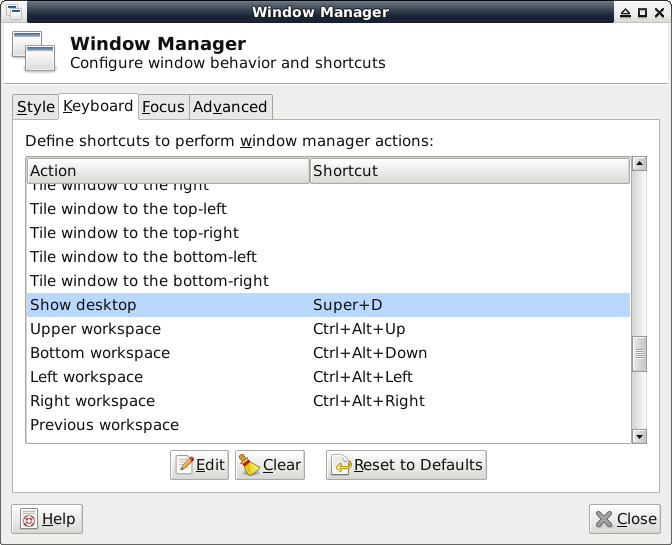
Win + D顯示桌面:
Application => Settings => Window Manager
設定Touchscreen
Application => Settings => Session and Startup
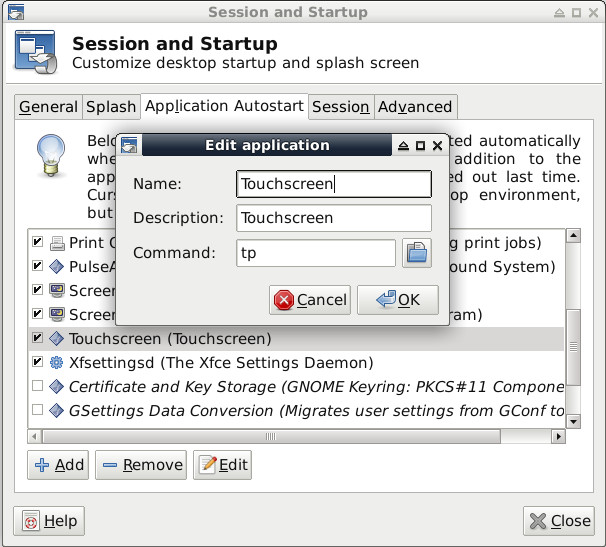
tp
#!/usr/bin/python
import os
import sys

path = '/tmp/x.log'
os.system('xinput --list > ' + path)
f = open(path)
c = f.readlines()
f.close()

for x in c:
    if ('Goodix Capacitive TouchScreen' in x) == False:
        continue
    r = x.split('id=')[1]
    nid = (r.split('\t')[0])
    cmd = "xinput -set-prop " + str(nid) + " 'Coordinate Transformation Matrix' 0 1 0 -1 0 1 0 0 1"
    print cmd
    os.system(cmd)
    break;