Steward
分享是一種喜悅、更是一種幸福
驅動程式 - Windows Driver Model (WDM) - 使用範例 - Assembly (MASM32) - Hello, world!
參考資訊:
https://wasm.in/
http://four-f.narod.ru/
https://github.com/steward-fu/ddk
使用Assembly語言寫驅動程式是一件相當挑戰的事情,畢竟討論資源相對稀少,加上Assembly語言的可讀性比C/C++差以及Microsoft提供的Include及範例程式都是以C/C++語言為主,因此,比較少人想要使用Assembly語言開發驅動程式,雖然比較乏味、難度也比較高,不過若能排除這個困難,使用組合語言寫出一支WDM驅動程式,細心品味Assembly語言的優雅,那將是一件意義非凡的事情,Microsoft Assembly語言經過多次改進,目前已經可以支援高階語法,如:If、While、Struct等語法,越來越高階,所以不該再把Assembly語言,想像是落後的語言,想對每個細節的瞭解,Assembly語言還是最佳的選擇,司徒接著就介紹如何使用Assembly語言寫一支Hello, world!驅動程式,畢竟Hello, world!還是最經典以及簡單的入門首選
main.asm
.386p
.model flat, stdcall
option casemap:none

include c:\masm32\include\w2k\ntddk.inc
include c:\masm32\include\w2k\ntstatus.inc
include c:\masm32\include\w2k\ntoskrnl.inc
include c:\masm32\include\w2k\ntddkbd.inc
include c:\masm32\Macros\Strings.mac

public DriverEntry

.data
pNextDevice PDEVICE_OBJECT 0

.code
AddDevice proc pMyDriver : PDRIVER_OBJECT, pPhyDevice : PDEVICE_OBJECT
    local pMyDevice : PDEVICE_OBJECT
    local szDevName : UNICODE_STRING

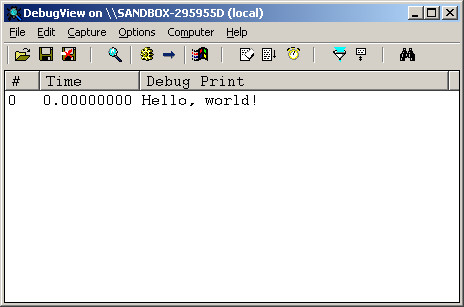
    invoke DbgPrint, $CTA0("Hello, world\:")
    invoke RtlInitUnicodeString, addr szDevName, $CTW0("\\Device\\MyDriver")
    invoke IoCreateDevice, pMyDriver, 0, addr szDevName, FILE_DEVICE_UNKNOWN, 0, FALSE, addr pMyDevice
    invoke IoAttachDeviceToDeviceStack, pMyDevice, pPhyDevice
    mov pNextDevice, eax

    mov eax, pMyDevice
    or (DEVICE_OBJECT ptr [eax]).Flags, DO_BUFFERED_IO
    and (DEVICE_OBJECT ptr [eax]).Flags, not DO_DEVICE_INITIALIZING
    mov eax, STATUS_SUCCESS
    ret
AddDevice endp

Unload proc pMyDriver : PDRIVER_OBJECT
    ret
Unload endp

IrpPnp proc pMyDevice : PDEVICE_OBJECT, pIrp : PIRP
    IoGetCurrentIrpStackLocation pIrp
    movzx eax, (IO_STACK_LOCATION ptr [eax]).MinorFunction

    .if eax == IRP_MN_REMOVE_DEVICE
        invoke IoDetachDevice, pNextDevice
        invoke IoDeleteDevice, pMyDevice
        fastcall IofCompleteRequest, pIrp, IO_NO_INCREMENT
        ret
    .endif

    IoSkipCurrentIrpStackLocation pIrp
    invoke IoCallDriver, pNextDevice, pIrp
    ret
IrpPnp endp

DriverEntry proc pMyDriver : PDRIVER_OBJECT, pMyRegistry : PUNICODE_STRING
    mov eax, pMyDriver
    mov (DRIVER_OBJECT ptr [eax]).MajorFunction[IRP_MJ_PNP * (sizeof PVOID)], offset IrpPnp
    mov (DRIVER_OBJECT ptr [eax]).DriverUnload, offset Unload
    mov eax, (DRIVER_OBJECT ptr [eax]).DriverExtension
    mov (DRIVER_EXTENSION ptr [eax]).AddDevice, AddDevice
    mov eax, STATUS_SUCCESS
    ret
DriverEntry endp
end
L55~60:只有做Callback設定的動作,需要設定AddDevice、PNP、DriverUnload這三個Callback
L22~30:產生一個Device Object,用來管理新加入的裝置(純軟體虛擬裝置也算),接著初使化相關旗標
L43~45:主要處理移除Device Object的動作,其餘Irp不處理,直接往下傳遞
main.inf
[Version]
Signature="$WINDOWS NT$"
Class=Unknown
Provider=%MFGNAME%
DriverVer=10/01/2026,1.0.0.0

[Manufacturer]
%MFGNAME%=DeviceList
%MFGNAME%=DeviceList,NTamd64

[DeviceList]
%DESCRIPTION%=DriverInstall.NTamd64,*MyDriver

[DeviceList.NTamd64]
%DESCRIPTION%=DriverInstall.NTamd64,*MyDriver

[DestinationDirs]
DriverCopyFiles=12

[SourceDisksNames]
1=%INSTDISK%

[SourceDisksFiles]
main.sys=1

[DriverInstall.NTamd64]
CopyFiles=DriverCopyFiles

[DriverCopyFiles]
main.sys

[DriverInstall.NTamd64.Services]
AddService=FILEIO,0x00000002,DriverService

[DriverService]
DisplayName=%SERVICE_DESC%
ServiceType=1
StartType=3
ErrorControl=1
ServiceBinary=%12%\main.sys

[DriverInstall.NTamd64.HW]
AddReg=DriverHwAddReg

[DriverHwAddReg]
HKR,,SampleInfo,,""

[Strings]
MFGNAME="MyDriver"
INSTDISK="MyDriver Disc"
DESCRIPTION="MyDriver"
SERVICE_DESC="MyDriver Kernel Driver"
autorun.inf
[autorun]
open=run.bat
run.bat
e:\devcon.exe install e:\main.inf *mydriver
e:\devcon.exe remove e:\main.inf *mydriver
fix.py
import os
import sys
import pefile

if len(sys.argv) != 2:
    print('Usage: {} xxx'.format(sys.argv[0]))
    sys.exit()

fname = sys.argv[1]
pe = pefile.PE(fname);
pe.OPTIONAL_HEADER.CheckSum = pe.generate_checksum();
pe.write(fname);
Makefile
all:
	myx86 "c:\masm32\bin\ml.exe" /c /coff /Cp /Zi /Zd main.asm
	lld-link main.obj /driver /base:0x10000 /subsystem:native /entry:DriverEntry /safeseh:no /opt/wadk/masm32/lib/wxp/i386/ntoskrnl.lib /out:main.sys
	python3 fix.py main.sys

run:
	genisoimage -o cdrom.iso * run.bat /opt/wadk/tools/devcon.exe
	myqemu winxp

clean:
	rm -rf main.sys main.obj main.pdb app.obj app.pdb app.exe main.err cdrom.iso
編譯
$ make
$ make run
完成
裝置管理員
DeviceObject